SAVED REPLIES
Answer common questions faster
Use auto responses as a starting point and tailor the reply to the visitor.
Explore Auto Responses
WHOSON AGENT TOOLS
Give agents the context to help from the first message. Use saved replies, review past conversations and handle more than one chat from the WhosOn client.
On-premises or private cloud. Built by Parker Software.

FROM FIRST MESSAGE TO FOLLOW-UP
Give agents the information and tools they need at each stage of the conversation.
SAVED REPLIES
Use auto responses as a starting point and tailor the reply to the visitor.
Explore Auto ResponsesCONVERSATION HISTORY
Review previous interactions, handle multiple chats and exchange files in the chat window.
Explore Chat HistoryLIVE TRANSLATION
Configure real-time translation to help agents and visitors communicate across languages.
Explore Live Translation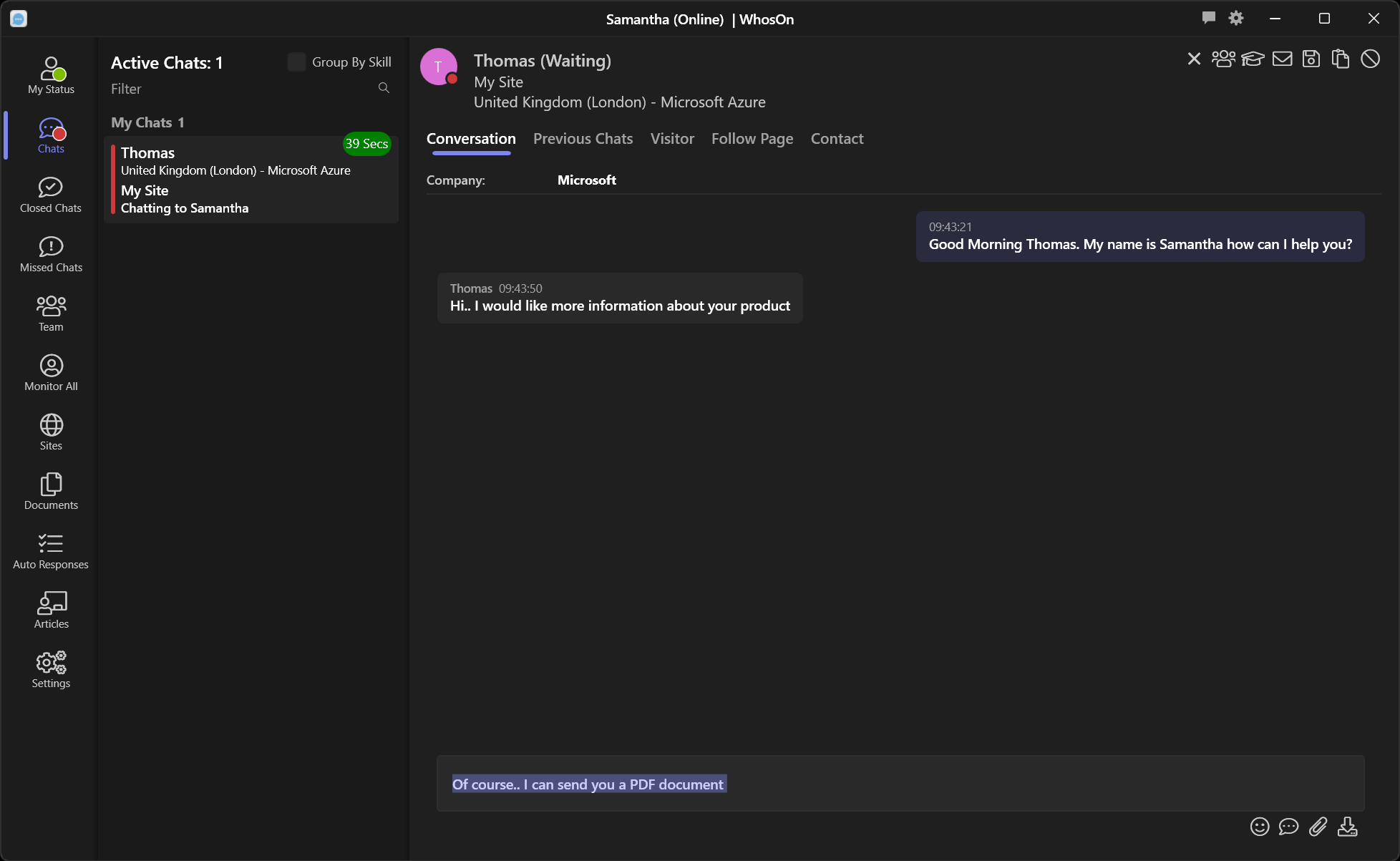
AGENT CAPABILITIES
Find the tools for composing replies, managing conversations and helping customers during a live chat.
An AI bot can follow a live conversation and suggest replies. The agent reviews and edits the suggestion before deciding whether to send it.
Explore AI IntegrationIncluding agent avatars in your chat window can create a personal, authentic feel. Using photos can help make the chat experience less faceless, and add that friendly human touch.
Auto-text speeds up your chat handling time. With it, you need no longer search through a library of auto responses to reply to FAQ.
Auto responses are a great way to shorten your live chat response times. With auto responses, you can set up answers to your most commonly asked questions and save agent keystrokes.
Chat alerts keep your agents and customers in the loop. They provide the users engaged in chat sessions with a series of notifications, to help ensure a smooth conversation flow.
Inactive chat users can harm your productivity. When a user has ceased engaging with the chat session, but not actively exited, that chat remains open. In turn, this can slow down chat queues.
The easier your messages are to read, the better the chat experience for the customer. This is where chat markdown becomes important.
Our chat preview feature gives you a sneak-peek into the visitor’s message. You can see what the visitor is typing as they type - before they hit the ‘send’ button.
With WhosOn, you can access all your chat sessions - taken and missed - from a single destination. In turn, this makes it easier for you to locate, analyse and export chats.
Sometimes, you might miss a chat session. Others, the customer might not be able to continue to talk there and then. Or key information might transpire after a chat session has already closed.
WhosOn makes it easy to help multiple customers at once. Unlike a telephone call, where you can only speak to one person at a time, live chat allows you to balance several concurrent chats.
The last thing you want to type in a live chat session is: “Sorry - what were we discussing?” Those kind of questions are embarrassing for agents, and annoying for the customer.
A good live chat experience isn’t all about software and features. It’s also about the service provided by your agents. They need to be alert, attentive and efficient.
You may often need to share hyperlinks and email addresses during your chat sessions. So, WhosOn recognises and reacts to this content accordingly.
Our file upload feature helps you offer a streamlined customer journey. Instead of launching an email to share documents, you can complete your transfers right inside the live chat window.
See who’s on your website and which pages they’re viewing in real time, before they start a chat.
Internal chat is great for team collaboration - allowing agents to chat to their colleagues in the same way they can chat to visitors.
A live chat spell checker helps you give professional service at speed. You can type out messages quickly and confidently, without having to worry about any lax spelling errors.
Not all the customers contacting you will be sat behind a computer or laptop. Many will be landing on your website from their mobile device - meaning the need for mobile chat.
After a chat, it’s handy to be able to categorise the session and its purpose. That way, you can analyse why customers most often reach out to you via chat. (And include this metric in your reports.)
Pre-set messages help the conversation get started. Rather than typing the same welcome message to every new chat user, pre-set messages kick the conversation off quickly and conveniently.
Not all your customers will speak the same language. So, WhosOn offers a real-time chat translation option, to help remove communication barriers with customers.
Access WhosOn with only an internet-connected device. The WhosOn web client allows live chat operators to log into WhosOn and handle chats directly from their browser of choice.
DESKTOP AND WEB CLIENTS
Use the WhosOn desktop client on Windows or open the web client in a browser to handle live chats.